● Available on App Store

PlayOver for iPhone

Share any song to any platform, right from the iOS Share Sheet. No more sending links that your friends can't open.

Built for the way you share music.

🔗

Share Sheet Integration

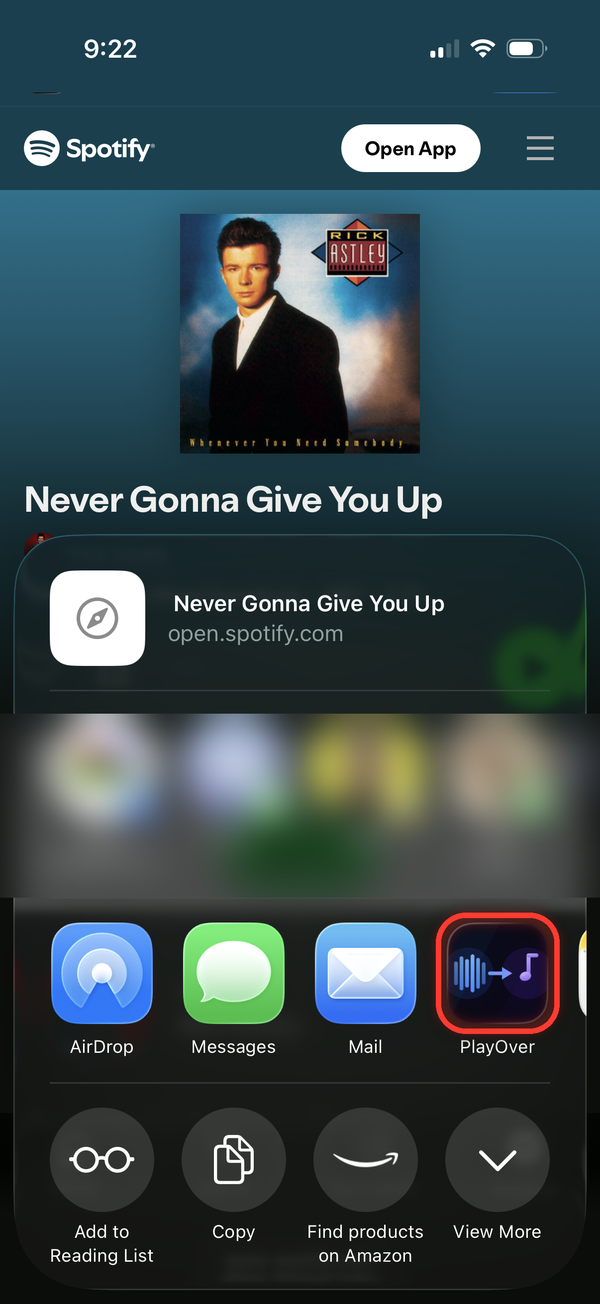
PlayOver lives in the iOS Share Sheet. Tap Share on any song in any music app and PlayOver is right there — no app switching required.

🎯

Set a Default Platform

Choose your preferred streaming service once. PlayOver will always open links there automatically, so you never have to pick again.

📜

Conversion History

Every link you convert is saved locally. Tap any entry in your history to reopen it on your platform — great for rediscovering songs.

Instant Results

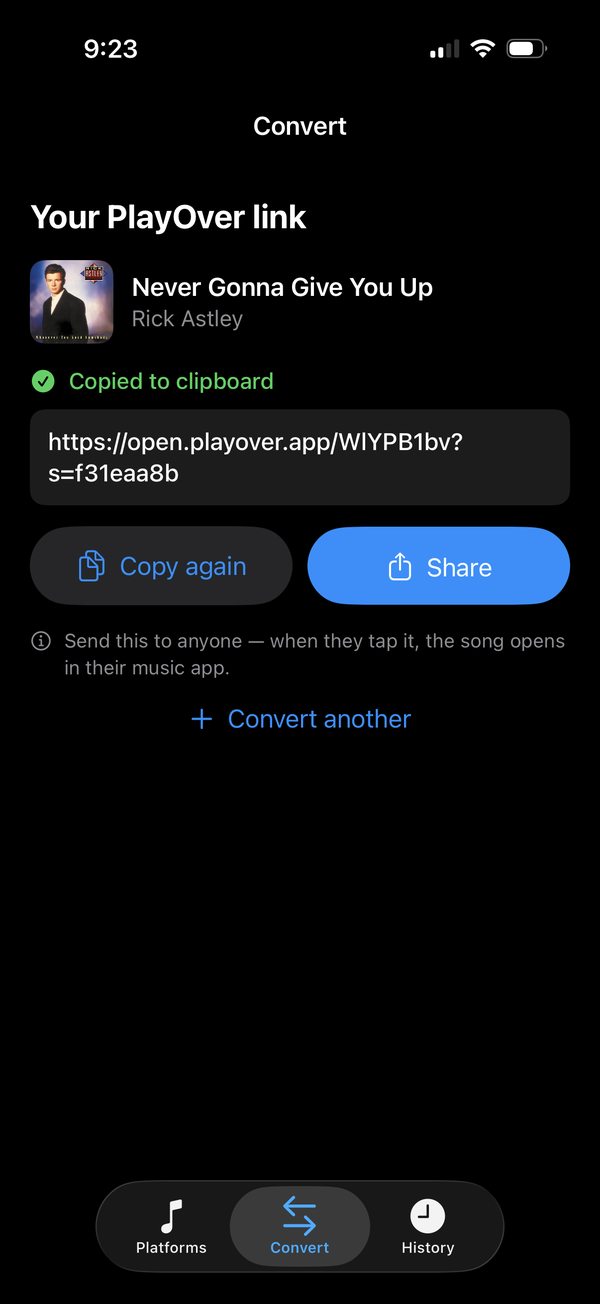
PlayOver uses a smart caching layer so most popular songs resolve in under a second. Even new tracks are found in just a few seconds.

🔒

Private by Design

No account required. PlayOver doesn't collect your name, email, or identity, and we never sell your data. Usage analytics are anonymous.

💰

Completely Free

No subscriptions, no ads, no in-app purchases. PlayOver is free to download and use forever — on every platform.

Up and running in 60 seconds.

PlayOver is designed to feel like it was always part of your iPhone. Setup takes less than a minute.

1

Download PlayOver

Get PlayOver free from the App Store. No account or sign-up needed.

2

Open PlayOver and set your platform

Launch the app and tap the streaming service you use. A checkmark confirms your choice — you can change it any time.

3

Tap Share on any song

In Spotify, Apple Music, YouTube, or any supported app, tap the Share button and select PlayOver from the list.

4

The song opens on your platform

That's it. PlayOver finds the song and opens it exactly where you want it, every time.

Common questions.

How do I convert a music link?
Tap the share button in any streaming app — Spotify, Apple Music, YouTube Music, and others — then select PlayOver from the Share Sheet. PlayOver will instantly find and open the song on your preferred platform. You can also paste a link directly into PlayOver from your clipboard.
Which streaming services are supported?
PlayOver supports Spotify, Apple Music, YouTube, YouTube Music, Amazon Music, Tidal, and Deezer — both as sources and destinations. That covers the vast majority of music listeners worldwide.
How do I set my preferred platform?
Open PlayOver and tap the platform you want as your default. A checkmark appears to confirm. From that point on, any link you convert will automatically open on that platform. You can change your preference any time by tapping a different service in the app.
Does PlayOver need to be open to work?
No. PlayOver works through the iOS Share Sheet extension, which runs in the background. You don't need the PlayOver app to be open — just tap Share in any music app and choose PlayOver from the menu.
What if a song isn't available on my platform?
PlayOver uses multiple fallback methods to locate the song. If a direct match can't be found on your preferred platform, PlayOver will show all available options and let you choose. In rare cases, a very new or regional release might not be found — PlayOver will let you know if that happens.
Why isn't PlayOver appearing in my Share Sheet?
First, make sure you've opened PlayOver at least once after installing it — iOS requires this to register Share Sheet extensions. When you tap Share, iOS shows a row of apps; if PlayOver isn't there yet, scroll that row all the way to the right and tap More to find it in the full list. After you use PlayOver a few times this way, iOS learns to surface it automatically, and it'll show up directly in the Share Sheet without needing to scroll to More.
What data does PlayOver collect?
PlayOver doesn't require an account and never collects your name, email, or personal identity. It does send anonymous analytics (via PostHog) to help improve the app — including the links you convert, the platforms involved, and general device and locale info — associated only with a random device ID, never with you personally. We don't sell your data. Your on-device conversion history stays on your device. See our Privacy Policy for full details.
What iOS version does PlayOver require?
PlayOver requires iOS 15 or later. It works on all iPhones compatible with iOS 15 and newer.